Lustereczko, five months on
OpenAI announced Intelligent UI on October 7, 151 days after the debut of lustereczko-mcp. This may be cause for celebration, in that a single developer is often able to innovate at a much higher rate than even the frontier labs. It is also an opportunity to reflect on over 4 months of use and progress that still leaves Intelligent UI in the dust as far as capabilities. Where is lustereczko now and what innovative ways of interacting with an agent does it offer?
Questions about a passage, answered next to it. The agent is GitHub Copilot in VS Code; the video is real time, not sped up. How it was wired.
Lustereczko-mcp is rooted in a belief that LLMs can interact with the user in a much richer way than through chat. We use LLMs to generate copious amounts of code every day, why not use the same capability to generate on-the-fly custom interfaces to communicate with the user? We can start with a simple example: let’s visualize something. OpenAI gives us a bicycle, but I think our readers could use something better - let’s see if we can give you a good intuition why a positive result from a test that correctly identifies 99% of the positive cases can still mean you have less than a 10% chance of actually being sick. Here is what my agent built for that:
Can you see how effective UIs can be at conveying complicated ideas? Bret Victor made the same point years ago with his circuit demo in Inventing on Principle.
However, that is just a beginning, and our biggest bottleneck right now is our own habit of thinking of UI as difficult to change. Imagine trying to sort a few hundred photos in a directory into buckets. LLM can help you, but ultimately you need to glance at each photo to decide where it will go. You can use a couple of Finder windows with a gallery view, and stitch everything together yourself and then beat your head against the wall as you perform the mind-numbing file drags and renames, or… you can ask your agent to make you a custom UI in lustereczko.
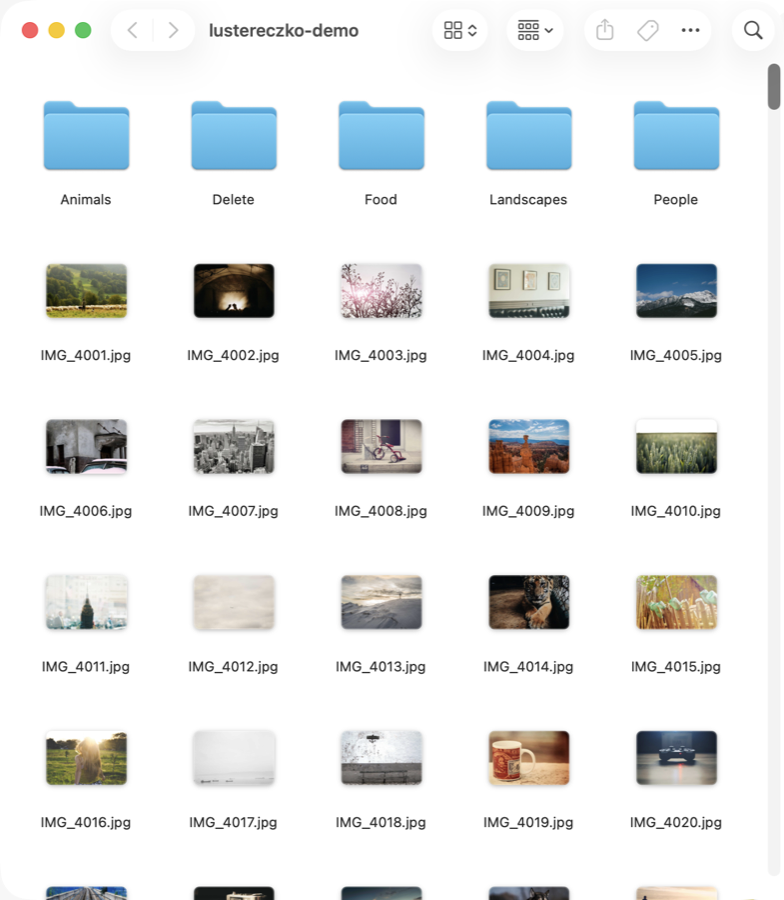
Ultimately, I think we will arrive at a human-LLM interaction model where the agent buries itself deep inside a custom application that it had generated to interact with the user. Something like a book author that is there to speak with you about their book, and answering all your questions, and going on tangents that there was no place for in the book… Maybe also quizzing you on the content to make sure you are learning the material. For a vision like that, MCP-App runs into limitations since you are still within the host chat UI and it is probably not the right platform. In fact, the lustereczko-mcp project originally started as a demo that dynamic UI could not be done within MCP, and I was expecting it to be proved in one evening.
As it turns out, you can push the MCP protocol quite far. For the current limits, look at the Declaration of Independence reader at the beginning of this post. It demonstrates fully bidirectional communication between the MCP App and the agent in the hosting app, GitHub Copilot in VS Code (how it was wired). I am not sure it carries its weight yet, because we are limited to the size of window an MCP App is allowed, but imagine a world where your entire agentic UI was wired up like that, and changed based on your requests and the task at hand.
I was trying to keep this post short, so you can stop reading here if you are just interested in the ideas. The rest of this post discusses some details about what capabilities exist and how some of this was accomplished within MCP and the MCP-App extension. The code is in pslusarz/lustereczko-mcp.
How it works
Lustereczko-mcp is a general purpose MCP-App server designed to be run locally. You can think of it as a custom app platform your agent can deploy to. In some ways this is not that different from Anthropic’s artifacts, just built on an open platform and also designed to do useful things on your machine.
To allow a dynamic UI to display, we immediately hack the MCP-App static resource, replacing its blank canvas with code passed to the tool. We needed to use a couple of tricks for that, but it works (see display_ui_to_user and the bridge). In order to stabilize things, we also expose some skills as tools on the server to tell the agent how to get the most out of the UI. The agent is strongly encouraged to use HTMX in order to avoid the complicated event flows that take place in React. This isn’t a fundamental limitation, but a practical one, given current LLM capabilities and some practical reports: Simon Willison tells his agents to avoid React because those attempts are more likely to crash, and the htmx folks make the case for hypermedia MCP apps.
The trick behind the blank canvas
The resource the host loads is the same page every time: htmx, the MCP Apps bridge, and an empty container. The HTML the agent wrote travels in the tool result’s _meta, and the bridge pours it into the container. Scripts inserted through innerHTML do not run, so the bridge re-creates each one. Both sides are trimmed to their shape.
@mcp.tool(app=AppConfig(
    resource_uri="ui://display"))
def display_ui_to_user(html_fragment: str):
    return ToolResult(
        content=[TextContent(type="text",
            text="Content displayed to user.")],
        meta={"html": html_fragment},
    )
app.ontoolresult = (result) => {
  const html = result._meta?.html;
  if (!html) return;
  container.innerHTML = html;
  htmx.process(container);
  // innerHTML does not run scripts,
  // so each one is re-created
  executeScripts(container);
};
Next, we had to figure out how the agent can communicate with the UI bidirectionally. MCP app protocol has a provision for pushing a tool result into the UI, but it is very clunky and allows only a single event to happen: the result of the call that rendered it. Initially, I implemented a logging tool, and instructed the agent how to instrument it for debugging. What works better is communication over named channels, because of lack of control over how host systems choose to run the MCP server (on Anthropic’s platform, you will have several instances running, so messages do not get read without a named channel and durable backing). Here we still have some shortcomings, because we do not have a sure way to trigger the host system to keep polling. Many host systems have scheduled jobs, and this works in Anthropic’s Claude desktop app, so long as the agent is reminded to use it.
The MCP spec also includes an obscure ability of the server to call back to the host’s LLM, known as sampling. The problem is that sampling is barely supported: according to this compatibility matrix, VS Code and Goose support it, while Claude Desktop, Claude Code, ChatGPT and Cursor do not. When I tried it from the Copilot agent in VS Code, the request never even left the server, because under the latest version of the protocol (2026-07-28) the server can no longer initiate requests to the host, and sampling itself is deprecated. So we chose not to use it in lustereczko. More details on how the UI and the agent talk to each other are in the ui-agent-communication skill and the bidirectional events recipe.
What a channel looks like
The agent picks the channel id before it renders, and bakes it into the HTML as a constant, so both sides know it without a handshake. Each channel is a pair of small JSON queues on disk behind a file lock, which is the durable backing: it does not matter which copy of the server a call lands on.
agent  channel = "ch-1749312345678"
agent  display_ui_to_user(html with MY_CHANNEL = "ch-1749312345678")
ui     poll_ui_messages(ch)      []              every 1.5 s
agent  notify_ui(ch, "refresh")
ui     poll_ui_messages(ch)      [refresh]
ui     notify_agent(ch, "ack")
agent  poll_agent_messages(ch)   [ack]
The last line is the weak spot from the paragraph above: nothing wakes the agent up to make that call.
How the Declaration demo was wired
The reader is one display_ui_to_user fragment: the text, a margin for comments, and a channel id. Asking about a highlighted passage sends notify_agent("ask", {thread_id, quote, paragraph, question, history}), and the card polls poll_ui_messages until an answer with its thread id arrives.
On the other side is the agent in GitHub Copilot chat in VS Code. To get it to respond without anyone typing in the chat, it starts a tiny watcher script as a background terminal command. The script blocks until the channel’s queue file has something in it, then exits. Copilot tells the agent when a background command finishes, which gives it a new turn: it drains the queue with poll_agent_messages, writes the answer with notify_ui, and starts the watcher again. Waiting costs no tokens, and the chat stays free.
That wake-up could take half a minute, too slow for a video. For the recording, the agent stayed in its turn and ran the watcher in the foreground instead, answering each question as soon as it came in.
Finally, we would like to equip our app with the capability to perform some actions on the user’s system. This is done through custom MCP tool deployment, available via add_custom_tool and run_custom_tool. These tools can be run by both the agent and the UI, although they are mostly intended for the UI. The code backing them gets executed on the host machine.
Why there is no tool to list custom tools
It is unnecessary, since the agent knows what tools it just deployed.
It may help to visualize how this is all put together on the example of a file rename tool:
- 1 The agent calls lustereczko. Its tool calls go to the host.
- 2 The host relays
add_custom_tool, which savesrename_file.py, anddisplay_ui_to_user. - 3 The HTML comes back in the tool result, and the host renders it in the app's iframe.
- 4 The user renames a file in the app.
- 5 The app calls
run_custom_tool("rename_file", …). The host relays it, but it never reaches the LLM. - 6 The tool renames the file on disk.
- 7 The app posts the rename into the chat with
sendMessage. - 8 The agent reads it on its next turn.
The same flow as a sequence, including the agent using the tool itself
I see these capabilities as a bit of a pyramid, with dynamic UI at the bottom, and increasing power and capabilities having fewer and fewer applications.
Lastly, at the top of the pyramid is the capability to save an application for the future. A useful app that the user and the agent chiseled together should not have to be recreated each time. The next logical step after that may be to deploy an app off of the local machine. This is how Caribbean Fish Recall originated. I did not provide for automation of this, although the agent was able to peel the code away (pslusarz/caribbean-fish-recall) and deploy it to Railway with a few instructions.
If you would like to try it for yourself, it is verified to work in GitHub Copilot in VS Code, and in the Claude desktop app on a Mac, where MCP App support has moved from Cowork to Code, so make sure you are in the Code tab. Point your agent to the repo, pslusarz/lustereczko-mcp, and tell it to install it as a local MCP server.
Thank you for reading this far, and let me know your thoughts.
Comments and reactions